1.项目说明
1.1.项目架构图
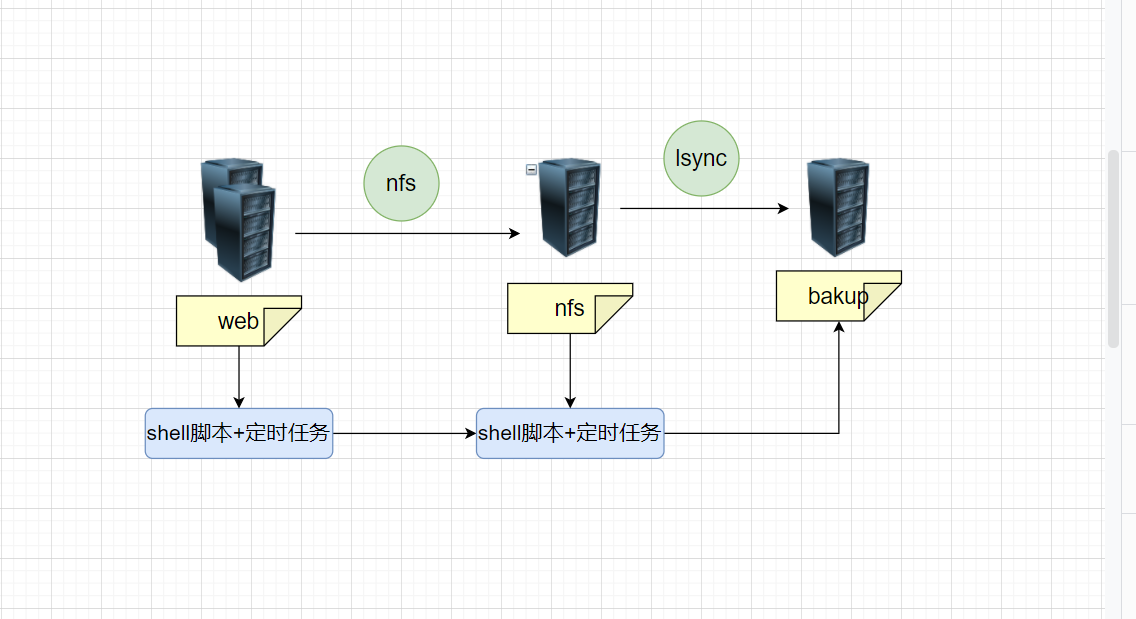
1.2.项目说明
nfs共享目录: /uploads
backup共享目录: /uploads
web服务器挂载nfs上的共享目录,使用户上传的数据统一存储到nfs服务器上,通过rsync+lsyncd服务监控/data目录,实时将用户上传的数据推送到backup服务器上。再通过shell脚本,将每台服务器上的重要目录或配置定时发送到backup服务器上
2.书写ansible剧本
2.1.rsync一键部署
playbook:
#rsync服务端部署
- hosts: bak
  tasks:
    - name: rsync服务端部署. 01.安装rsync服务
      apt:
        name: rsync
        state: present
    - name: 02.发送配置文件
      copy:
        src: ./rsyncd.conf
        dest: /etc/
    - name: 03.创建用户
      user:
        name: "{{ rsyncd_user }}"
        uid: "{{ rsyncd_user_uid }}"
        state: present
    - name: 04.创建共享目录
      file:
        path: "{{ shard_path }}"
        owner: "{{ rsyncd_user }}"
        group: "{{ rsyncd_user }}"
        state: directory
    - name: 05.创建密码文件
      file:
        path: "{{ rsyncd_passwd }}"
        mode: 600
        state: touch
    - name: 06.追加密码
      lineinfile:
        path: "{{ rsyncd_passwd }}"
        regexp: ^lxb
        line: lxb:1
    - name: 07.启动服务
      systemd:
        name: rsync
        state: started


#rsync客户端部署
- hosts: nfs
  tasks:
    - name: 01.创建密码文件
      file:
        path: "{{ rsyncd_client }}"
        mode: 0600
        state: touch
    - name: 02.追加密码
      shell:
        echo "1" > "{{ rsyncd_client }}"
rsyncd.conf.j2 配置文件模版:
###rsyncd.conf start###
fake super =yes
uid = {{ rsyncd_user }}
gid = {{ rsyncd_user }}
use chroot = no
max connections = 2000
timeout = 600
pid file = /var/run/rsyncd.pid
lock file = /var/run/rsync.lock
log file = /var/log/rsyncd.log
ignore errors
read only = false
list = false
#hosts allow = 10.0.0.0/24
#hosts deny = 0.0.0.0/32
auth users = {{ auth_user }}
secrets file = {{ rsyncd_passwd }}

[{{ shard_path }}]
comment = lxb 14:18 2012-1-13
path = /{{ shard_path }}2.2.nfs一键部署
playbook:
- hosts: nfs
  gather_facts: false
  tasks:
    - name: nfs-server 01.下载nfs-kernel-server,rpcbind
      apt:
        name:
          - nfs-kernel-server
          - rpcbind
    - name: 02.上传exports.j2模版
      template:
        src: ./exports.j2
        dest: /etc/exports
        backup: true
    - name: 03.创建用户
      user:
        name: "{{ nfs_user }}"
        uid: "{{ nfs_user_uid }}"
        state: present
    - name: 04.创建共享目录并修改权限
      file:
        path: "{{ nfs_shard_path }}"
        owner: "{{ nfs_user }}"
        group: "{{ nfs_user_uid }}"
        state: directory
    - name: 05.启动服务
      systemd:
        name: "{{ item }}"
        state: restarted
      loop:
        - rpcbind
        - nfs-server
- hosts: web
  gather_facts: false
  tasks:
    - name: 01.创建目录
      file:
        path: "{{ mount_directory }}"
        state: directory
    - name: nfs-client 02.挂载目录
      mount:
        src: "{{ nfs_server_ip }}:{{ nfs_shard_path }}"
        path: "{{  mount_directory }}"
        fstype: nfs
state: mountedexports.j2配置文件模版
{{ nfs_shard_path }} {{ allow_subnet }}(rw,all_squash,anonuid={{ nfs_user_uid }},anongid={{ nfs_user_uid }})2.3.lsyncd一键部署
playbook:
- hosts: nfs
  gather_facts: false
  tasks:
    - name: lsyncd服务端部署,01.下载lsyncd
      apt:
        name: lsyncd
        state: present
    - name: 02.发送lsyncd.j2模版文件
      template:
        src: ./lsyncd.j2
        dest: /etc/lsyncd.conf
        backup: true
    - name: 03.启动lsyncd服务
      systemd:
        name: lsyncd
state: startedlsyncd.j2配置文件模版
settings {
logfile="{{ lsyncd_log }}",
pidfile="/var/run/lsyncd.pid",
statusFile ="/var/log/lsyncd.status",
nodaemon= False,
maxProcesses=2
}


sync {
default.rsync,
source = "{{ source_dir }}",
target = "{{ target }}",
delay = 5,
delete = true,
	rsync = {
	binary = "/usr/bin/rsync",
	archive = true,
	compress = true,
	password_file = "{{ passwd_file }}"
}
}
2.4.定时备份配置
playbook:
- hosts: nfs web
  gather_facts: false
  tasks:
    - name: 定时备份 01.发送定时备份模版
      template:
        src: ./cron_tar.j2
        dest: /root/cron_tar.sh
        backup: true
    - name: 02.设置定时任务
      cron:
        name: 定时备份配置文件到backup服务器
        minute: 00
        hour: 00
        job: bash /root/cron_tar.sh > /dev/null 2>&1
        state: present
shell脚本
#!/bin/bash
source /etc/profile
##############################################################
# File Name:cron_tar.sh
# Version:V1.0
# Author:LXB
# Organization:self-study
# Desc:这是一个用于备份的脚本,配合定时任务使用
##############################################################

#vars
function vars(){
#本地IP
hostname_ip=`hostname -I|cut -d " " -f1`
#rsync服务端ip
rsyncd_ip={{ rsyncd_ip }}

date=`date +%F_%w`
#要进行备份的目录/文件
dirs_files="/etc"
#本地备份的目录
local_backup=/backup
#本地备份的地址
local_address="${local_backup}/${hostname_ip}/conf_${date}.tar.gz"
#rsync认证用户
rsync_auth="{{ auth_user }}"
rsync_path="backup"
#rsync客户端密码文件 用于免密传输
rsync_client_passwd="{{ rsyncd_client }}"

}


#4.日志函数  log 告警级别(eror/success) 做了什么
function log() {
  log_name=`basename $0`
  log_file=/var/log/${log_name}.log
  level=$1
  msg=$2
  time=`date +%F_%T`
  echo "$time [${level}] ${msg}" >>$log_file
}

#检查当前用户是否是root
function check_root(){
	if [ $UID -ne 0  ];then
		echo "请使用root用户执行此脚本"
		exit
	fi
}


function tar_pakage(){

	if [  -d ${local_backup} ];then
		mkdir -p ${local_backup}/${hostname_ip}
	else
		mkdir -p ${local_backup}/${hostname_ip}
	fi
	#备份到本地
	tar zcf ${local_address} ${dirs_files}
	if [ $? -eq 0 ];then
		log SUCCESS "本地备份成功!已备份到${local_address}"
	else
		log ERROE "本地备份失败!"
	fi

	#生成md5校验
	ip_address=${local_backup}/${hostname_ip}/
	md5sum ${ip_address}*.tar.gz >${ip_address}md5.txt

	#推送到rsync服务端
	rsync -a  ${local_backup}/ ${rsync_auth}@${rsyncd_ip}::${rsync_path}  --password-file=${rsync_client_passwd}
	if [ $? -eq 0 ];then
		log SUCCESS "已成功推送到rsync服务端!"
	else
		log ERROR "推送到rsync服务端失败!"
	fi
}

#定期删除旧的备份
function delete_tar(){
	old_bakup_num=`find $local_backup -type f -name "*.tar.gz" -mtime +7 |wc -l `
	if [ $old_bakup_num -ne 0 ];then
		find $local_backup -type f -name "*.tar.gz" -mtime +7 |xargs rm -f
		log SUCCESS "已成功清除7天之前的压缩包!"
	else
		log NOTICE "7天之前的备份数量为0"
	fi
}

main(){
	vars
	check_root
	tar_pakage
	delete_tar
}
main2.5.通用变量文件
group_vars/all/vars.yml 变量文件

#rsync-server
rsyncd_user: www
rsyncd_user_uid: 1999
shard_path: uploads
auth_user: rsync_backup
auth_user_passwd: 1
rsyncd_client: /etc/rsyncd.client
rsyncd_passwd: /etc/rsyncd_passwd

#nfs

nfs_user: www
nfs_user_uid: 1999
nfs_shard_path: /data
nfs_server_ip: 172.16.1.31
allow_subnet: 172.16.1.0/24
mount_directory: /uploads

#lsyncd
lsyncd_log: /var/log/lsyncd.log
source_dir: /uploads/
target: rsync_backup@172.16.1.41::uploads
passwd_file: /etc/rsyncd.client

#cron_tar
rsyncd_ip: 172.16.1.41

文章评论